Automated PR Architecture Diagramming Service
How to Build a High-Margin Micro-SaaS: Automating Architecture Diagramming for Developers
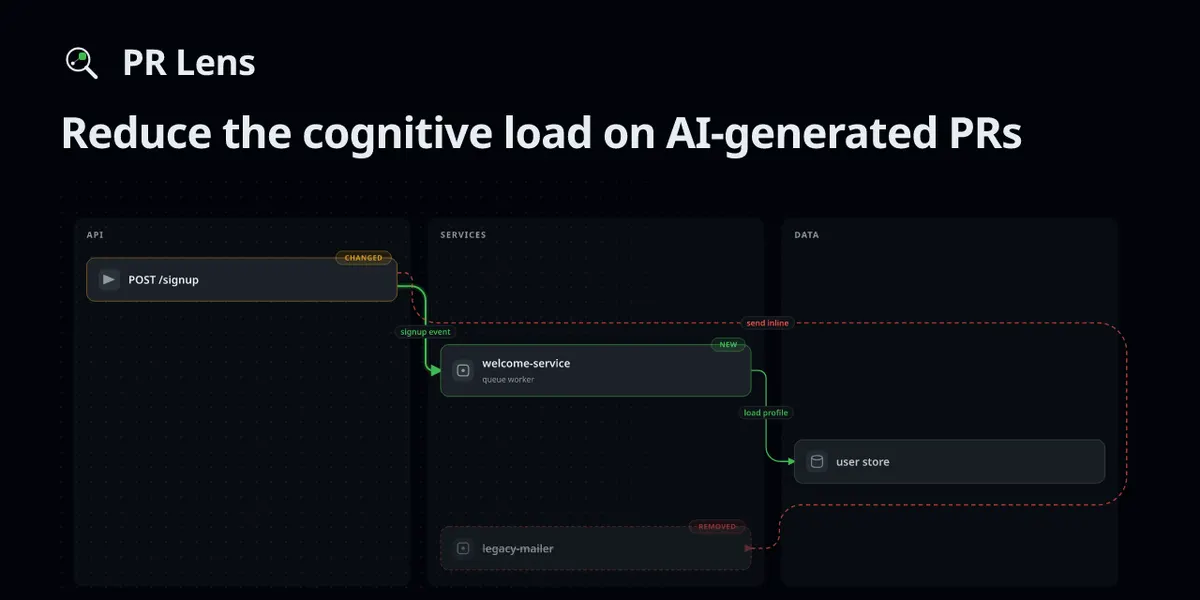
The current gold rush in artificial intelligence isn't just about generating text or images; it is about solving the "cognitive load" problem in technical workflows. As AI-generated code becomes more prevalent, the sheer volume of pull requests (PRs) is exploding. For senior engineers and tech leads, the bottleneck is no longer writing code—it is reviewing it. This gap presents a massive opportunity for developers to build niche developer-tools that provide immediate, visual value.
One of the most lucrative ways to monetize this trend is by creating an automated documentation or visualization service. Specifically, a service that converts complex code changes into animated ai-diagrams. By helping teams visualize the "blast radius" of a change or the new data-flow pipelines, you aren't just selling a tool; you are selling time and mental clarity.
The Problem: The "Wall of Diff" Fatigue
In modern software-engineering, a typical pull request consists of a long list of file changes, often hundreds of lines deep. While a skilled engineer can parse these changes, understanding how a change affects the broader system architecture is difficult. Traditional documentation is almost always out of date. This creates a high risk of "regression," where a small change in one module inadvertently breaks a distant part of the system.
The solution lies in automation. Imagine a system that sits inside a github workflow, analyzes the diff, and instantly posts an animated diagram directly into the PR comment section. This diagram would use color coding—green for new components, amber for modified ones, and red for removed elements—to show exactly what the code change touches.
The Business Model: Three Tiers of Monetization
If you were to develop a tool like this, you could structure your income using a classic SaaS (Software as a Service) model. Here is how you could scale your revenue:
- The Freemium GitHub App: Offer a basic version of your tool as a GitHub App that provides static architecture diagrams. This builds your user base and brand awareness within the developer community.
- The Pro/Team Tier ($20–$50 per user/month): This tier introduces animated data-flow pipelines and "live" interaction. Users can click checkboxes to toggle different views (e.g., showing only database changes vs. API changes). This is where you target mid-sized startups.
- The Enterprise Tier (Custom Pricing): For large corporations, you offer self-hosted versions or private CI/CD integrations. Here, security is the selling point. Companies want to use their own API keys (OpenAI, Gemini, or Anthropic) through GitHub Actions so that their proprietary code never leaves their controlled environment.
Step-by-Step: Building the Automated Diagramming Service
To compete in this space, you don't need to build an LLM from scratch. You need to build the orchestration layer that connects code changes to visual outputs.
1. The Analysis Engine
Your service must first "read" the code. You can utilize existing AI models to perform this task. Instead of asking an AI to "explain this code," which produces a boring text summary, you instruct the AI to output a structured JSON document. This document describes the nodes (services, databases, functions) and the edges (the relationships and data flows) that have changed.
2. The Rendering Pipeline
Once you have the JSON representation of the code change, you need to turn it into something beautiful. Using libraries like D3.js or specialized SVG renderers, you can convert that JSON into ai-diagrams. To make your tool stand out, focus on animation. Showing a "pulse" moving along a new data path is far more intuitive than a static image.
3. Seamless Integration
Marketing Your Tool: Where the Customers Are
Once your tool is functional, you need to reach the people who suffer from "diff fatigue." Avoid traditional advertising; instead, go where the engineers live.
- GitHub Marketplace: Listing your tool here is essential. It is the first place a CTO or Engineering Manager looks when searching for developer-tools.
- Open Release a lightweight, CLI-based version of your tool on github. When developers use your CLI to generate diagrams locally, they will naturally want the automated version that handles it for them in every PR.
- Technical Content Marketing: Write deep-dive articles on platforms like Medium or Dev.to. Don't just say "my tool is good." Instead, write about "Reducing Cognitive Load in Large-Scale Microservices
- Product Hunt: Launching on Product Hunt can provide the initial surge of users and backlinks needed to boost your SEO.
Scaling to Passive Income
The beauty of a tool built on automation is that once the infrastructure is set, the maintenance is relatively low. As you move from a manual service to a hosted GitHub App, your role shifts from "coder" to "operator."
As your user base grows, you can expand your feature set into other areas of the software-engineering lifecycle. Perhaps your tool doesn't just diagram PRs, but also automatically generates documentation for new API endpoints, or creates visual "onboarding maps" for new hires joining a project. Each of these features represents a new revenue stream within the same ecosystem.
The opportunity in AI is moving away from "chatbots" and toward "workflow agents." By building tools that visualize the invisible complexities of code, you are positioning yourself at the forefront of the next wave of developer productivity software.
To streamline your development workflows, these real-world AI monetization case studies demonstrate how specialized automation tools can drive significant revenue.