Build Custom AI-Powered Mini-CRMs for B2B Lead Tracking
Why I Ditched Salesforce and HubSpot for a Custom Mini-CRM
When our startup hit its first wave of B2B leads, the natural instinct was to reach for the big names. We started with Salesforce, because our founding sales lead insisted it was non-negotiable. Six months later we migrated to HubSpot, because our marketing co-founder swore by it. Both people were right about one thing: tracking the pipeline is essential. But neither system earned its keep at our scale.
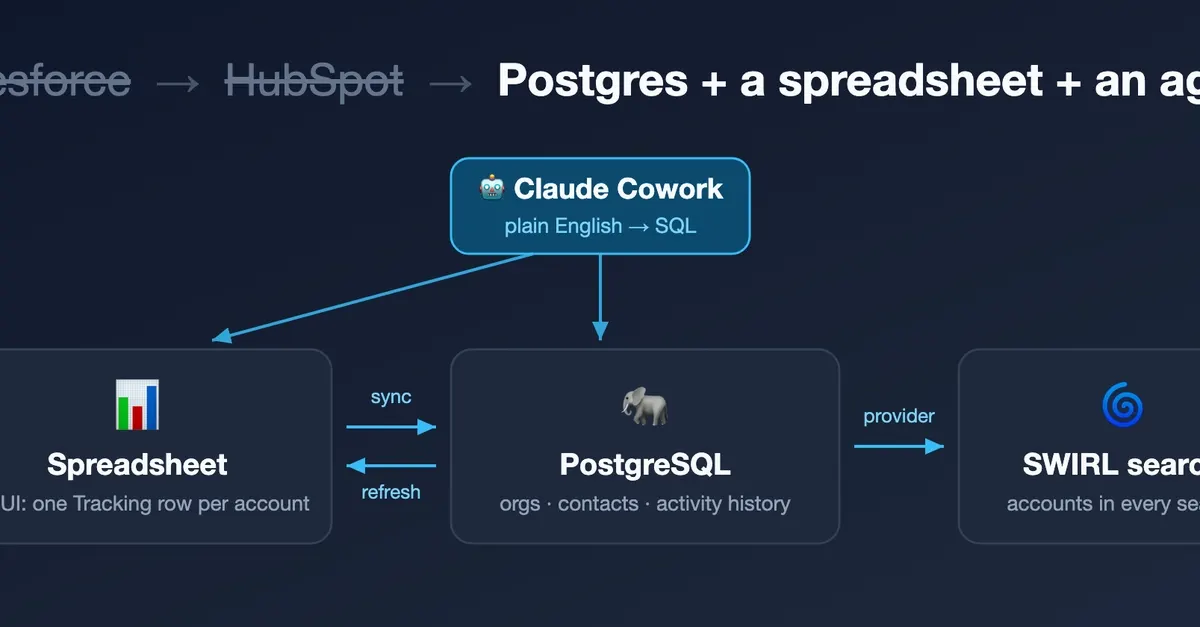
The truth surfaced the day I exported every record. What the data actually looked like was a spreadsheet: three columns of company names labeled Engaged Prospects, Legal, and Partners/Channels. Over 100 organizations, no statuses, no activity history, no next steps. A full CRM had twice proven to be overkill; the spreadsheet was underkill. So I replaced both with a mini-CRM built in an afternoon using tools we already ran: local PostgreSQL, the spreadsheet itself, and SWIRL for search.
Letting an AI Agent Design the Schema
Instead of forcing the spreadsheet into a generic CRM mold, I let an AI Agent read it with openpyxl and propose a schema built for the actual job: tracking activity, not just listing names.
- Activities are append-only history, not a mutable "last touched" field. You never lose the story of an account.
- Status is free-form text. We started with a suggested vocabulary, but the first real update was "dead", which was not on the list. A CHECK constraint on status would have turned a one-word instruction into a schema migration. Constrain the things that break joins (category); leave vocabulary to the humans.
The Daily Views That Replaced Dashboard Hopping
Two views do most of the daily work:
-- Latest activity per organization
CREATE VIEW org_latest_activity AS
SELECT o.id, o.name, o.category, o.status,
 a.activity_date AS last_activity_date,
 a.activity_type AS last_activity_type,
 a.summary AS last_activity_summary,
 a.next_step, a.next_step_due
FROM organizations o
LEFT JOIN LATERAL (
 SELECT * FROM activities a
 WHERE a.org_id = o.id
 ORDER BY a.activity_date DESC, a.id DESC
 LIMIT 1
) a ON true;
-- The daily to-do list
CREATE VIEW daily_todos AS
SELECT o.name, o.category, o.status,
 a.activity_type, a.summary,
 a.next_step, a.next_step_due
FROM organizations o
JOIN activities a ON a.org_id = o.id
WHERE a.next_step IS NOT NULL
 AND a.next_step_due <= CURRENT_DATE
ORDER BY a.next_step_due ASC;
That second view became our morning checklist. Instead of logging into HubSpot and clicking through half a dozen dashboards, we ran one query and saw every lead that needed attention today.
Automation Without the Overengineering
The real win came from Automation. Every morning, a small script runs the daily_todos view and sends a Slack reminder to whoever owns that category. When a new row lands in the spreadsheet, an AI Agent parses it, inserts the organization, and tags it with the right category. No manual data entry. No forgotten follow-ups.
We also wired SWIRL into the search bar on our internal dashboard. Typing "Acme Corp" pulls up the full activity history across organizations, contacts, and notes, without writing a JOIN.
The Bug We Shipped and Caught
On day two, a teammate flagged a problem: some leads were showing up twice in the spreadsheet, under different categories. Our UNIQUE (name, category) constraint was correct per category, but we had not guarded against the same company appearing in two categories. The fix was a quick migration:
ALTER TABLE organizations
ADD CONSTRAINT org_unique_name
UNIQUE (name);
After merging duplicates, we added a simple rule in the ingestion script: if a name already exists, update the existing row instead of inserting a new one.
Why PostgreSQL Was the Right Fit
For a team already comfortable with SQL, PostgreSQL was the path of least resistance. It gave us:
- ACID reliability for lead data
- Flexible JSON columns for ad-hoc notes
- Lateral joins for efficient "latest activity" queries
- Full-text search as a lightweight fallback when SWIRL was not needed
At roughly $0 in hosting costs on our existing server, it was also far cheaper than either Salesforce or HubSpot.
Scaling the Mini-CRM Beyond the Spreadsheet
Lessons for Other B2B Teams
If you are a B2B team drowning in either too much CRM or too little structure, consider this approach:
- Start with your actual data, not a vendor's template.
- Use an AI Agent to translate messy spreadsheets into a schema that fits your workflow.
- Keep the schema tight on things that break joins (categories, IDs) and loose on things that evolve (status, notes).
- Build daily views that answer the questions you ask every morning.
- Automate the boring parts: ingestion, reminders, and search.
You do not need a $300 per user per month platform to track B2B leads. You need a database that reflects how you actually work, a few smart agents to keep it clean, and automation that turns data into action.