Make Money Building Fintech Apps with Bank Statement OCR
Why Manual Statement Processing Breaks Fintech Workflows
What a Specialized Bank Statement OCR API Delivers
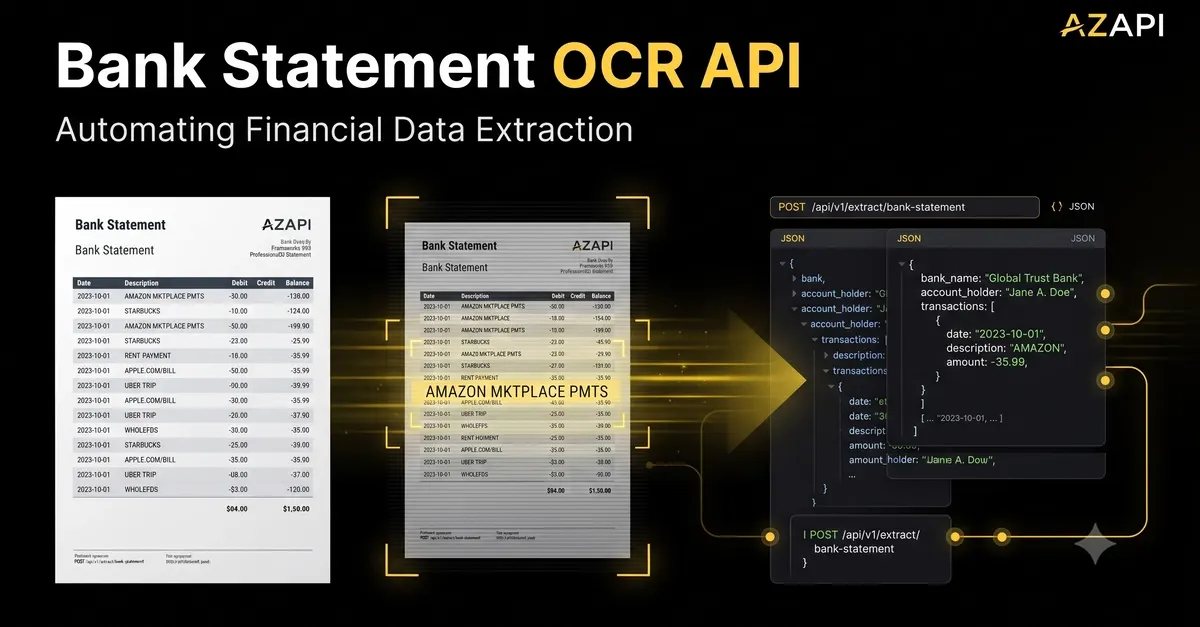
A purpose-built bank statement OCR API is an application programming interface designed explicitly for financial documents, trained on thousands of real statements from institutions worldwide to understand both text and document structure. Unlike generic OCR tools, it maps extracted data to the correct financial fields automatically, delivering clean, structured output that integrates directly into your application. It pulls every data point fintech tools require, including:
- Account holder name and contact information
- Account number (including masked variants for security)
- Statement period and issuance date
- Individual transaction dates, descriptions, debit amounts,
- Opening and closing balances for the statement period
- Bank and branch identification details
The output is delivered as standardized JSON that requires no manual data mapping. For example, a single transaction row from a statement is returned as a structured object like this:
{"date": "2026-08-05", "description": "Grocery Store Purchase", "debit": 124.37, "
This structured format is instantly usable for downstream workflows, from underwriting to transaction categorization, eliminating hours of manual work for your team or your users.
Core Capabilities That Separate Financial OCR From Generic Tools
When evaluating a bank statement OCR API for your fintech or SaaS product, look for these key features to ensure it meets financial use case requirements:
- Layout agnostic processing: Handles PDFs, scanned images, JPGs, and PNGs from any global bank, including multi-page statements with split transaction tables and non-standard formatting.
- Context-aware data mapping: Correctly assigns values to the right fields based on their position and surrounding text, so it never mixes up a
- PII and data masking: Automatically redacts sensitive information like full account numbers or social security numbers if needed for compliance with financial regulations.
- Built-in validation rules: Flags inconsistencies, such as a closing balance that does not match the opening balance plus total
- SaaS-ready scalability: Most providers offer pay-as-you-go pricing, so you only pay for the statements you process, with no upfront costs for model training or infrastructure, and can handle spikes in usage during peak periods like tax season or lending application surges.
High-Impact Fintech Use Cases for Automated Statement Extraction
Bank statement OCR APIs power some of the most common workflows across the fintech ecosystem, driving massive efficiency gains for both providers and end users:
- Lending and underwriting platforms: Instead of asking loan applicants to manually enter months of transaction history, underwriting teams can have applicants upload bank statements directly. The OCR API extracts income, recurring expenses, debt payments, and cash flow data automatically, cutting underwriting time from 3-5 business days to under 24 hours. Leading lending platforms using this automation report a 70% reduction in manual data entry work and a 40% drop in application processing errors.
- Accounting SaaS tools: Platforms like QuickBooks, Xero, and emerging accounting SaaS products use statement OCR to let users upload bank statements and auto-reconcile transactions, categorize expenses, and generate financial reports without manual input. This automation eliminates one of the most time-consuming tasks for small business owners, driving higher user retention for SaaS tools.
- Expense management software: Employees can upload business bank or
- Personal finance and budgeting apps: Users can upload bank statements to get instant insights into their spending habits, track progress toward financial goals, and identify areas to cut costs, no manual transaction entry required.
- Anti-fraud and compliance tools: Fintech platforms can cross-
For a SaaS platform processing 10,000 statements per month, automating this step saves $44,000 in monthly labor costs alone, plus reduces error-related costs from incorrect data entry.
How to Integrate a Bank Statement OCR API Into Your Fintech Stack
Integrating a statement OCR API is far faster and more cost-effective than building a custom document processing pipeline. Follow these steps to get up and running:
- Select a provider that fits your use case: For general purpose use, cloud providers like Google Cloud Document AI and Amazon Textract offer pre-trained bank statement OCR models. For specialized fintech use cases, providers like Ocrolus, Inscribe, and FinBox offer purpose-built financial OCR APIs with built-in compliance and validation features. You can find many of these tools listed on platforms like RapidAPI or the AWS Marketplace for easy testing.
- Configure your API endpoint: Set up your API key, define accepted input formats (PDF, JPG, PNG, etc.), and configure any custom fields you need extracted. For example, if you only need transaction data for expense tracking, you can skip account holder fields to reduce processing time.
- Test with real-world sample data: Test the API with statements from the banks your users are most likely to use, including edge cases like low-quality scanned statements, foreign currency transactions, and statements with multiple sub-accounts. Aim for an extraction accuracy rate of 98% or higher for production use.
- Build validation layers on top of the API output: Even the most accurate OCR tools have a small error rate, so add simple validation rules to catch mistakes. Calculate the total of all extracted debits and
- Integrate structured data into your workflows: Use the JSON output to auto-populate forms, sync transactions to your internal ledger, or feed data into your underwriting or accounting workflows. Most OCR APIs offer webhooks, so you can trigger downstream actions as soon as a statement is processed.
- Ensure compliance with financial regulations: Verify that your OCR provider is compliant with relevant regulations in your operating regions, including GDPR, CCPA, and PCI DSS if you are handling sensitive payment data. Choose providers that offer data encryption in transit and at rest, and clear data retention policies.
Common Mistakes to Avoid When Implementing Statement OCR
- Using generic OCR for financial documents: Generic OCR tools are not trained on financial document layouts, so they will frequently misread numbers, mix up debit and
- Skipping validation logic: Even a 1% error rate can lead to significant problems for fintech applications, from incorrect underwriting decisions to mismatched accounting records. Always add validation checks to catch errors before they impact your users.
- Ignoring regional and bank-specific variations: If you operate in multiple countries, make sure your OCR provider can handle statements from local banks, including non-English languages, different date formats, and local currency symbols.
- Overlooking scalability for SaaS use cases: If you are building a SaaS product, choose an OCR provider that offers pay-as-you-go pricing and can handle spikes in usage, such as during tax season or peak lending periods, without downtime or latency issues.
For fintech developers, bank statement OCR APIs eliminate one of the most time-consuming, error-prone parts of building financial applications. By automating the extraction of structured data from statements, you can reduce operational costs, speed up core workflows like underwriting and accounting, and deliver a better experience for your users—all without investing months of development time into building a custom document processing pipeline. As the fintech space continues to grow, tools that streamline back-office and data entry work will be a key differentiator for SaaS products and financial platforms alike.