Building No-Code AI Agents for Business Operations
The No-Code Shift: Building AI Agents Without Engineering Expertise
Manual, repetitive tasks are the silent productivity killer for small business operations teams, marketing operators, and revenue leaders. Filing engineering tickets for small workflow tweaks can take weeks, off-the-shelf automation tools rarely fit your team’s exact needs, and the time spent on administrative work takes away from high-impact work like campaign strategy and customer relationship building. That’s where no-code AI agents for business operations come in: powerful, customizable tools you can build and deploy without writing a single line of code, to automate the work that eats up your team’s time every week.
In August 2026, Microsoft published a plain-language guide to building agents directly in Microsoft 365 Copilot, a tool most businesses already use for daily work. The platform’s Agent Builder lets non-developers construct functional AI agents using natural language prompts instead of code, no specialized training required. You can ground your agent in your team’s existing approved knowledge: SharePoint sites, uploaded internal documents, Copilot connectors for tools like your CRM or project management software, even shared inboxes. For marketing, RevOps, and sales ops teams, this means you can build custom tools to pull campaign data, update lead records, or triage support tickets without filing an engineering request and waiting weeks for a solution.
Chatbots vs. Proactive AI Agents: What’s the Real Difference?
The core distinction between a basic chatbot and a full AI agent is proactive, independent action. A chatbot waits for a user to submit a prompt before responding, making it useful for FAQs but limited for complex workflows. An AI agent, by contrast, can take action on its own when specific triggers are met: for example, automatically sending a follow-up email to a lead 2 hours after they download a whitepaper, or updating a CRM record when a support ticket is marked resolved. That autonomy creates huge value for business operations, but it also means a misconfigured agent can send incorrect emails to customers, update records with wrong data, or take other actions that damage trust if you don’t build in guardrails from day one.
Building Your First Low-Risk AI Agent Pilot for Business Operations
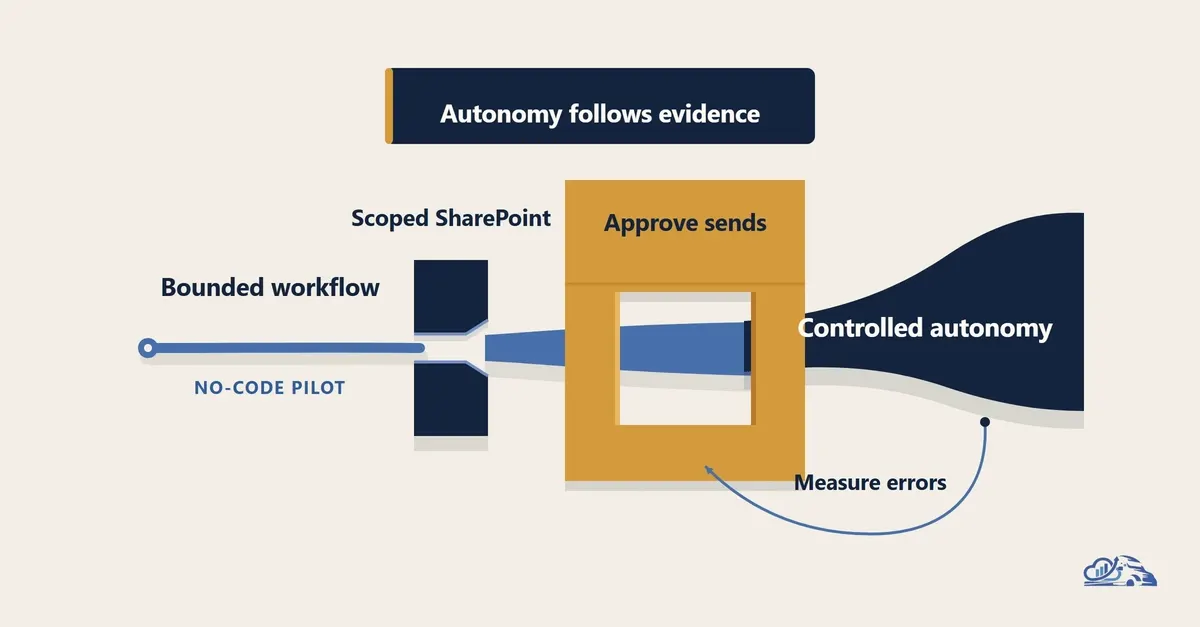
The safest first AI agent workflow is bounded, repetitive, frequent, and easy to reverse. Bounded work has a clear, narrow set of tasks with no ambiguity. Repetition makes the task predictable for the agent to learn. Frequency gives your team regular opportunities to test and evaluate performance. Reversibility limits the cost of any mistake the agent makes.
Non-Negotiable Controls for Production-Ready AI Agents
Before you treat any AI agent as ready for full business use, build these five guardrails into your workflow. These are not optional extras for a polished demo: they are the foundation of a reliable, safe tool for your team:
- Scoped access: Limit the agent’s knowledge and permissions to only what the workflow requires. If your agent is only meant to tag CRM leads, don’t give it access to your full financial records or employee personal data.
- Approval gates: Add explicit human sign-off steps for any action that could impact customers or business operations. For example, require a sales ops manager to approve any lead assignment the agent makes for the first 30 days of use.
- Full logging: Preserve a clear, accessible record of every piece of information the agent uses and every action it takes. This makes it easy to troubleshoot issues and audit the agent’s performance over time.
- Failure recovery protocols: Define exactly what the agent does if it can’t complete a task. For example, if it can’t find the lead scoring criteria document, it should send a Slack alert to the ops team instead of guessing or skipping the task entirely.
- Regular evaluation: Schedule weekly checks to review a sample of the agent’s actions and answers, to make sure it’s aligned with your team’s goals. Adjust its instructions or access as needed as your business evolves.
Turn Your No-Code AI Agent Expertise Into Income
Even if you don’t run your own business, your ability to build these no-code AI agents for business operations is a highly marketable skill. Small businesses and solopreneurs are eager to automate their workflows but lack the time or technical knowledge to build tools themselves, creating a huge opportunity for side income or even a full-time service business.
On freelance platforms like Upwork and Fiverr, small businesses actively seek contractors to build custom automation and AI agent solutions for their operations. A basic lead tagging and assignment agent for a 5-person sales team typically costs $500 to $1,500 to build, while more complex agents for e-commerce order management, customer support triage, or campaign performance reporting can fetch $2,000 to $5,000 per project. If you prefer passive income, you can create pre-built, customizable AI agent templates for common use cases—such as a HubSpot CRM lead tagging agent or a Zendesk support ticket routing agent—and sell them on Gumroad for $29 to $99 each. Many creators also offer premium customization packages for an extra $200 to $500 fee, to tailor the template to a client’s specific tool stack and workflow. For recurring income, you can offer monthly maintenance retainers for $100 to $300 per client, which cover updating the agent’s knowledge base, adjusting its triggers as the business grows, and troubleshooting any issues that arise.
The barrier to building useful AI agents for business operations has never been lower. With no-code tools like Microsoft 365 Copilot Agent Builder, you don’t need to be a developer to automate repetitive, time-consuming tasks for your team or your clients. Start small with a low-risk, bounded pilot, build in the right guardrails, and you can cut down on manual work for your business or build a profitable side hustle selling agent builds and templates to other small teams.
To scale these operational workflows, you can reference these real-world AI monetization case studies for a better understanding of current market demand.